Suila for Android: privacy-focused mobile video editing with on-device AI
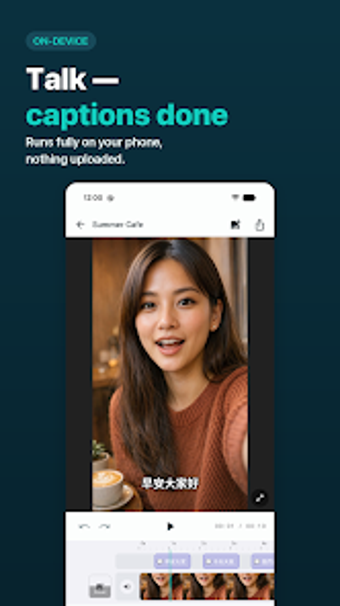
Suila splits mobile editing into tactile production steps: timeline trimming, teleprompter recording, and on-device AI captioning and face tracking for fully local projects. Developed by Hanpo, the Android app runs all speech-to-text and face-mosaic processing on your device without sign-in or ads. It presents caption styling, multi-point speed control, and 4K export options, aimed at vloggers and social creators who prioritize privacy and direct control over finished clips.
The app delivers professional camera-to-share workflows on a phone
You can assemble footage on a timeline that supports split, trim, and long-press reordering, then add picture-in-picture, voiceover, or a built-in teleprompter for narrated takes. The tool exports in multiple canvas ratios including 9:16 and 16:9 and supports 4K output, which lets you produce platform-ready clips without moving files off the device. The workflow aligns to capture, edit, export stages that creators follow on mobile.
On-device AI preserves privacy while automating captioning and face blur
The app runs automatic captions and face mosaic tracking locally, so your media never leaves your phone and no account is required. Automatic captions support Mandarin, Cantonese, English, Japanese, and Korean and you can import or export SRT files. Face mosaic tracks and blurs faces frame-by-frame, and beauty retouching detects faces for selective smoothing while keeping facial features intact.
Speed control, styling, and depth for creators who need finer control
For time manipulation the editor exposes multi-point curves for fluid speed ramps normally found in desktop editors, and it offers cinematic LUTs, 19 transitions, and support for custom .ttf/.otf fonts for text styling. Audio extraction from video and built-in voice recording let you assemble narration and separate stems. These tools add depth for creators ready to invest a little time learning the controls.
A gateway tool for privacy-minded creators who want advanced mobile control
The app is a strong gateway for creators who need advanced editing without cloud processing: it keeps projects local, offers timeline-driven assembly, and includes high-resolution exports. If you value on-device AI and no-account operation, the app gives direct, hands-on editing on a single device; users who require desktop-level mixing consoles or external collaboration features should expect trade-offs.